
Custom Room Setup Guide
Many Free Fire enthusiasts prefer regular matches, but some players enjoy the excitement of playing in custom rooms with their friends. However, a lot of players are still unsure about how to set up a custom room in the game.
Whether you're new to Free Fire or have been playing for a while, this guide will help you navigate the process, especially since recent updates have introduced changes to the game.
A custom room in Free Fire allows you to host your own match. You get to invite specific friends and control the entire gameplay environment.
With custom rooms, you can set your own rules and configurations. Adding a password ensures that only invited players can join, giving you full authority over who participates and under what conditions.
These rooms are available for various game modes, including Clash Squad and Battle Royale. You can tailor the map selection, number of players, team setups, and other settings to your liking.
Here’s how to create a custom room step by step:
Start by launching Free Fire on your device.
From the home screen, navigate to the mode section.
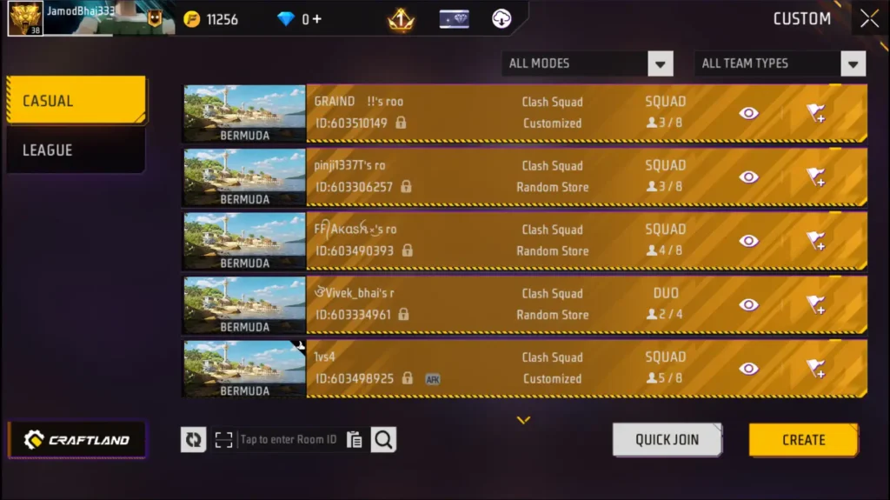
Look towards the bottom left where you’ll find the 'Custom' option, typically located beneath the Clash Squad rank. Tap on it to proceed.
Click on the 'Create' option in the bottom right to start your own custom match.
To join an existing player-created session, simply select the 'Quick Join' button instead.
You will be presented with a menu displaying all the available custom rooms for entry.
After hitting the create button, the room configuration panel will appear.
You’ll notice four main tabs: room, game, spectate, and special settings.
Under the room tab, you can pick between two types of matches:
- Regular: ideal for casual games with friends.
- Advance: designed for competitive play or tournaments.
Here, you also have the option to name your room and set a password, ensuring that only invited players with the password can join.
Moving on to the game tab, you can select from various modes such as:
- Clash Squad
- Battle Royale
- Bomb Squad 5v5
- Lone Wolf
- Team Deathmatch
- Rush Hour
- Battle Cage
If you opt for Battle Royale, additional choices like map selection will be available.
Depending on the game mode chosen, you’ll see different customization options. These include:
- Gameplay type: solo, duo, or squad
- Maximum number of players allowed
- Number of spectators permitted
- Minimum player level required to join
In the special settings section, you can tweak reset options and other mode-specific features.
Lastly, the spectate tab lets you manage what spectators are allowed to view, such as only their own team or all players in the match.
Creating Private Match
Once your preferences are set, the final step awaits.
You will be presented with two clear choices.
Select 'Create Room' to instantly bring your private match to life.
Your personalized arena is now active, ready for you to send invites to teammates or rivals.
This concludes the walkthrough for establishing a private match in Free Fire.
Ideal for casual play with friends or organizing competitive events, custom rooms offer the perfect solution.
We trust this information was useful for your gaming journey.
Stay informed on all Free Fire developments by following our channels.
You might also explore these related topics.
The exciting Free Fire MAX crossover with Sholay brings exclusive items.
Discover the top character skill synergies for the current Battle Royale ranked season.
Learn about the most effective team compositions for climbing the BR ranks.
Free Fire Diamond: Usage and Acquisition
Free Fire Diamond is a valuable currency within the popular Free Fire game, enabling players to unlock special skins, outfits, and premium equipment to personalize their gameplay experience.
To obtain Free Fire Diamond, gamers often visit trusted trading platforms like Codashop, Games Kharido, or Google Play to top up their accounts quickly and securely.
These platforms make acquiring Free Fire Diamond simple, so players can enjoy the latest in-game items and enhancements without delay.
Free Fire top up on LootBar
If players are looking to top up Free Fire Diamond, they might consider using the lootbar game trading platform for their purchase.
LootBar.gg offers a professional and secure environment for transactions, ensuring that every diamond free fire top-up is handled with utmost safety and convenience. The platform supports a wide range of popular games, including Free Fire, and provides 24/7 online customer service along with various payment methods to cater to players globally.
Moreover, when it comes to free fire top up, LootBar stands out by offering competitive discounts on in-game currencies. Players can benefit from price reductions, with some items enjoying discounts of up to 20%, making it a cost-effective choice for acquiring free fire top up diamonds without compromising on service quality or security.
How to top up Free Fire on LootBar
- Begin by visiting the LootBar official website and selecting your preferred language and currency type, then log in to your account.
- Navigate to the free fire top up centre by choosing the Top Up section and selecting Free Fire from the list of available games.
- Decide on the amount of Free Fire Diamond you want to purchase and click on the “Top-up Now” button.
- Enter your Free Fire UID when prompted to ensure the diamonds are credited to the correct account.
- Continue by clicking Top-up, select your preferred payment method, and follow the instructions to complete the payment and finalize your purchase.
What is the best Gaming Top-Up Platform?
As a trusted choice for gaming top-up, LootBar offers both top speed and affordability. The platform has earned a reputation as the best platform for gaming recharge, supported by outstanding customer feedback—4.9/5.0 on Trustpilot.